
Goal
The goal of qpost is to support the creation and maintenance of Quarto blog posts in RStudio and Positron. The package provides tools to create new posts with properly structured YAML front matter, edit the metadata of existing posts, and add bibliographic metadata that can be imported automatically by reference managers such as Zotero.
The package provides three main functions:
-
qpost()creates a new Quarto blog post through an interactive dialog. It collects metadata such as title, author, date, categories, and image information, creates the post directory andindex.qmd, and optionally copies an image into the new directory. -
edit_post()opens the YAML metadata of an existing Quarto blog post in an interactive dialog and lets you modify it while preserving the post content. -
add_coins()adds COinS (ContextObjects in Spans) metadata to a Quarto blog post, allowing bibliographic information about the post to be recognized and imported by reference managers such as Zotero.
qpost() displays a dialog window where you can enter the metadata for a new blog post:
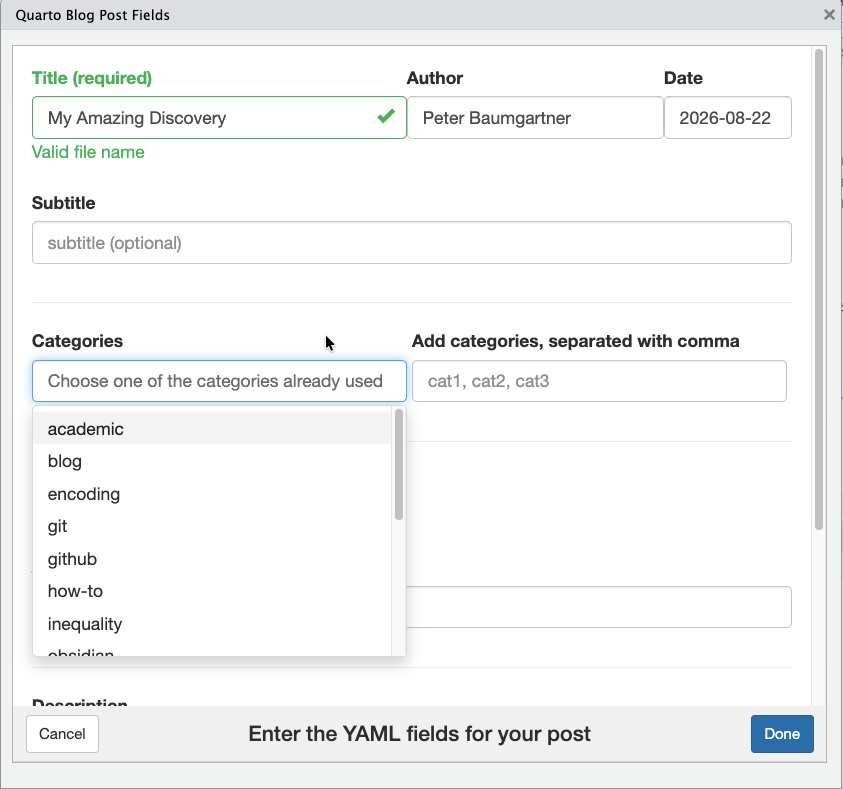
Dialog window for creating a blog post
After clicking the “Done” button the function generates the core skeleton of a Quarto post. This includes:
- creating the directory (named with the date and title in kebab notation)
- (optionally) copying images from your hard disk into the new created folder
- creating the
index.qmdfile with the YAML header populated from the data of the dialog window - opening the blog post file in RStudio for editing.
You can choose from your categories already created or add new categories. With the package comes also an RStudio Addin so you can bind the qpost() command with a shortcut.
Installation
You can install the package from CRAN with:
install.packages("qpost")Or install the development version from GitHub with:
# install.packages("devtools")
devtools::install_github("petzi53/qpost")
Example
library(qpost)

if (interactive()) {
  qpost()
}
Possible Configurations
To create Quarto posts even easier, you can configure qpost:
Provide a shortcut
- Choose “Tools -> Modify Keyboard Shortcuts …” from the RStudio menu.
- Filter the search box for “quarto”.
- Click into the column “Shortcut” of the “Create Quarto Post” addin.
- Provide your keyboard shortcut.
Add author name programmatically
If you are the only blog author on your machine, you can add your name to the author field automatically.
- Open
.Rprofile. The easiest way it to installusethis` and open.Rprofilewithusethis::edit_r_profile(). - Add the following line into
.Rprofile
- Restart RStudio.
Prevent confirmation question and verbose output
If you want to prevent the confirmation question before qpost() creates the folder with the post, the YAML header and (optionally) copies your chosen image, add another line into .Rprofile:
Define the draft status of the created file
You can specify if you want the new post with draft: true (Standard) or draft: false.
Show or hide empty fields
Not all fields are always needed. The default is to get the full list of all YAML fields provided by the dialog window, even if some of the fields are empty (show_empty_fields = true). With show_empty_fields = false only those fields with contents are displayed in the YAML front matter.
Summary
If you are going to add all lines to .RProfile, then your code snippets should look like:
options(
    qpost.author = "Peter Baumgartner",      # default = ""
    qpost.verbose = FALSE,                   # default = TRUE
    qpost.draft = FALSE,                     # default = TRUE
    qpost.show_empty_fields = FALSE          # default = TRUE
)
Do not forget to restart RStudio after you changed .Rprofile!
Acknowledgements
I am not very experienced in R programming, so I am very grateful that I could take help and suggestions from different sources:
I started with qpost() after a question or feature request at the Posit forum. I got some helpful links that I tried out and used as precursors for my implementation.
I took the new_post() script from The Mockup blog as an advanced organizer for the general structure of my approach. It has a very extensive and understandable explanation. I learned about the kebab notation I had never heard about until this blog post. For German umlauts – and special characters in other languages -, I added the line stringi::stri_trans_general((title), "latin-ascii") (learned from a StackOverflow answer).
I also used some ideas from the newpost package, particularly the use of RStudio Addins and the request that users choose from categories already used.
My knowledge of R programming is limited, but I am a complete newbie when it comes to Shiny apps. (I just started reading the fantastic Mastering Shiny book by Hadley Wickham.) I took the general structure of the Shiny window from the blogdown “New Post” RStudio addin by Yihui Xie. The lack of a similar function for Quarto was generally my main incentive to start with the qpost project in the first place.
I tried to follow the advises of R Packages in preparing this package for CRAN.
Contribution is welcome!
I am sure that my code is not efficient and that there are many ways to improve my package. I am very interested to learn better programming in R / Shiny / (JavaScript). If you find bugs or more efficient ways to solve my intended goal please do not hesitate to raise an issue or provide a pull request.